Figma
UI Design
Mobile app
MVP
UX research
DATA COLLECTION APP FOR ARCHAEOLOGY TEAMS: REDUCING MANUAL REWORK IN FIELD OPERATIONS
Project context
A mobile-first UX/UI solution for ArqueoPro, a digital platform created to help archaeology teams collect, organize, and access field data without relying on paper, spreadsheets, or multiple disconnected applications.

The problem was not just usability.
It was operational waste.
Archaeology teams often work in remote areas, under time pressure, with unstable connectivity and long field days. Even so, a significant part of the workflow still depends on paper notes, generic form apps, GPS tools, and manual data transfer after fieldwork.
In ArqueoPro’s research, 39% of surveyed archaeologists still used only paper and pen during fieldwork. The remaining professionals generally combined generic apps, spreadsheets, notebooks, and GPS tools, creating a fragmented, slow workflow prone to errors.
This generated three critical business problems:
Rework after long workdays
Data recorded in notebooks had to be manually transferred to Word files, Excel spreadsheets, or technical reports.
1
Higher risk of incomplete or inconsistent data
When information is spread across paper, photos, GPS devices, and spreadsheets, important fields can be forgotten, duplicated, or disconnected from their context.
2
Slower report preparation
For companies that rely on field data to deliver technical reports, every extra hour spent organizing information delays the final outcome.
3
Client objective
Create a digital field experience that would make data collection faster, more reliable, and easier to adopt, including for professionals accustomed to manual workflows.


My role in the project
I contributed to the product experience from research synthesis to high-fidelity interface design, translating the complexity of fieldwork into a clear, practical, and usable mobile experience.
UX research and interview synthesis
User journey mapping
User journey mapping
Information architecture
Mobile user flows
Wireframing
High-fidelity UI design prototype
Tools
The process: turning field complexity into a simple-to-use flow
The initial hypothesis was clear: archaeology professionals did not avoid digital tools because they rejected technology. They avoided tools that felt complex, unstable, or poorly suited to the reality of fieldwork.
1. Hypothesis
If the product could bring together forms, GPS, photos, and offline access in one simple workflow, archaeology teams could reduce rework and collect more consistent data in the field.
2. Validation
The research confirmed three main patterns:
Professionals already used digital tools when they saved time.
Offline mode was essential because many activities take place in areas without stable internet access.
Steep learning curves reduced adoption, especially when teams were under pressure in the field.


Design decisions
I organized the flow around field tasks, not app features
I designed forms with required fields, guided steps, and contextual inputs to reduce omissions during fieldwork
The architecture was designed to facilitate the expansion of the internal database and integration with a data management and analysis platform.
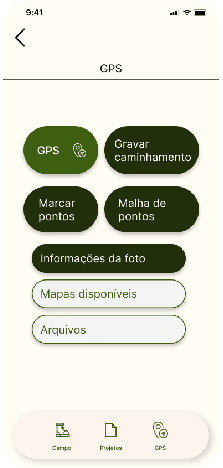
I connected GPS actions to data collection
I prioritized trust in offline use. The interface needed to clearly communicate whether data was saved, pending synchronization, or stored locally, since fear of losing information was a significant adoption barrier
From fragmented tools to an integrated field workflow
After
ArqueoPro centralizes the field workflow into one experience: form completion integrated with georeferencing and photos
The forms were designed for the reality of the site and reduced the need for typing on a mobile screen. The outcome is an experience built for real fieldwork, not generic software categories
Before
Archaeologists had to alternate between field notebooks, GPS apps, photo galleries, spreadsheets, and report documents
Duplicated work, inconsistent records, and extra hours spent organizing information after fieldwork
Design conceived from the start for measurable impact
This project was structured to validate adoption, operational efficiency, and improvements in data quality from the earliest stages
archaeology professionals participated in the research
reported using only paper and pen during fieldwork
in-depth interviews were conducted with experienced professionals to map real workflows, pain points, and data collection requirements
Pilot success metrics
The product was designed to be validated through KPIs:
completion of critical fields
of rework per night
in report-related corrections
User insight

Need a digital experience that proves its value?
Available for UX/UI Design, SaaS Landing Pages, Framer Development, and conversion-focused case study websites.
Giovanna Clara Soares da Silveira © 2026
All rights reserved.